> ## Documentation Index
> Fetch the complete documentation index at: https://mintlify.com/gradio-app/gradio/llms.txt
> Use this file to discover all available pages before exploring further.
# Sharing apps
> Share your Gradio apps with temporary links, authentication, and embedding options
Gradio makes it easy to share your machine learning demos with others. You can create temporary share links, add authentication, embed demos in websites, and more.
## Quick sharing with share links
The fastest way to share your app is with the `share=True` parameter:
```python theme={null}
import gradio as gr
def greet(name):
return f"Hello {name}!"
demo = gr.Interface(
fn=greet,
inputs="textbox",
outputs="textbox"
)
demo.launch(share=True) # Creates a public link
```
This generates a public link like `https://07ff8706ab.gradio.live` that you can share with anyone.
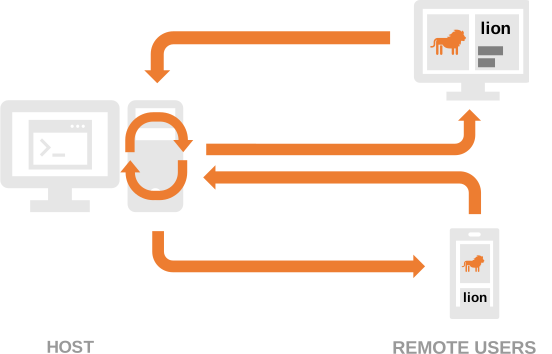
* Share links are valid for **72 hours**
* Share links are **publicly accessible**
* Processing happens on your local device
* Your device must stay online
### When to use share links
Share links are perfect for:
* Quick demos to colleagues
* Testing with remote users
* Temporary showcases
* Development and debugging
Share links are public! Anyone with the link can use your app. Don't expose sensitive information or allow critical operations without authentication.
## Authentication
### Basic username/password
Add simple authentication to your app:
```python theme={null}
import gradio as gr
def greet(name):
return f"Hello {name}!"
demo = gr.Interface(
fn=greet,
inputs="textbox",
outputs="textbox"
)
demo.launch(auth=("admin", "password123"))
```
### Multiple users
Support multiple username/password pairs:
```python theme={null}
import gradio as gr
def greet(name):
return f"Hello {name}!"
demo = gr.Interface(
fn=greet,
inputs="textbox",
outputs="textbox"
)
demo.launch(
auth=[
("alice", "password1"),
("bob", "password2")
]
)
```
### Custom authentication logic
Implement custom authentication functions:
```python theme={null}
import gradio as gr
def validate_user(username, password):
# Custom validation logic
return username == password # Example: username must equal password
def greet(name):
return f"Hello {name}!"
demo = gr.Interface(
fn=greet,
inputs="textbox",
outputs="textbox"
)
demo.launch(auth=validate_user)
```
### Access logged-in username
Get the current user's username using `gr.Request`:
```python theme={null}
import gradio as gr
def greet(request: gr.Request):
return f"Welcome, {request.username}!"
with gr.Blocks() as demo:
greeting = gr.Markdown()
demo.load(greet, None, greeting)
demo.launch(
auth=[
("alice", "pass123"),
("bob", "pass456")
]
)
```
### Logout functionality
Add a logout button:
```python theme={null}
import gradio as gr
def greet(request: gr.Request):
return f"Welcome, {request.username}!"
with gr.Blocks() as demo:
greeting = gr.Markdown()
logout_btn = gr.Button("Logout", link="/logout")
demo.load(greet, None, greeting)
demo.launch(
auth=[
("alice", "pass123"),
("bob", "pass456")
]
)
```
By default, `/logout` logs out from **all sessions**. To logout only the current session, use `/logout?all_session=false`.
### OAuth with Hugging Face
Enable "Sign in with Hugging Face" for your Space:
Add to your Space's `README.md`:
```yaml theme={null}
---
hf_oauth: true
---
```
```python theme={null}
import gradio as gr
def greet(profile: gr.OAuthProfile | None):
if profile is None:
return "Please log in"
return f"Hello {profile.name}!"
with gr.Blocks() as demo:
login_btn = gr.LoginButton()
greeting = gr.Markdown()
login_btn.click(greet, inputs=None, outputs=greeting)
demo.launch()
```
Use `gr.OAuthProfile` to get user information:
```python theme={null}
def get_user_info(profile: gr.OAuthProfile):
return {
"name": profile.name,
"username": profile.username,
"profile_url": profile.profile
}
```
OAuth features only work on Hugging Face Spaces. For local testing, log in with `huggingface-cli login` or set the `HF_TOKEN` environment variable.
## Deep links
Create shareable links that capture the current state of your app:
```python theme={null}
import gradio as gr
with gr.Blocks() as demo:
with gr.Row():
input_text = gr.Textbox(label="Input")
output_text = gr.Textbox(label="Output")
submit_btn = gr.Button("Submit")
deep_link_btn = gr.DeepLinkButton("Share this state")
submit_btn.click(
lambda x: x.upper(),
inputs=input_text,
outputs=output_text
)
demo.launch(share=True)
```
Users can click the deep link button to get a URL that preserves all component values at that moment.
Deep links require your app to be publicly accessible (hosted on Spaces or using `share=True`).
## Embedding Gradio apps
Once your app is hosted (on Hugging Face Spaces or your own server), you can embed it in websites.
### Web Components (recommended)
Web components offer better performance and automatic height adjustment:
Add to your HTML ``:
```html theme={null}
```
Place where you want the app:
```html theme={null}
```
#### Customization options
```html theme={null}
```
Available attributes:
* `src`: Full URL to the Gradio app
* `space`: Shorthand for Hugging Face Spaces (`username/space-name`)
* `eager`: Load immediately (`true`) or lazily (`false`, default)
* `initial_height`: Height while loading (default `300px`)
* `container`: Show border and hosting info (default `true`)
* `info`: Show hosting info only (default `true`)
* `autoscroll`: Auto-scroll to output (default `false`)
* `theme_mode`: `light`, `dark`, or `system` (default)
* `control_page_title`: Set page title to app title (default `false`)
#### Listen to events
```html theme={null}
```
### IFrames
For sites where you can't add JavaScript:
```html theme={null}
```
Set a fixed `height` and use `style="border:0;"` to remove borders. Add `allow` attributes for webcam/microphone access.
## API access
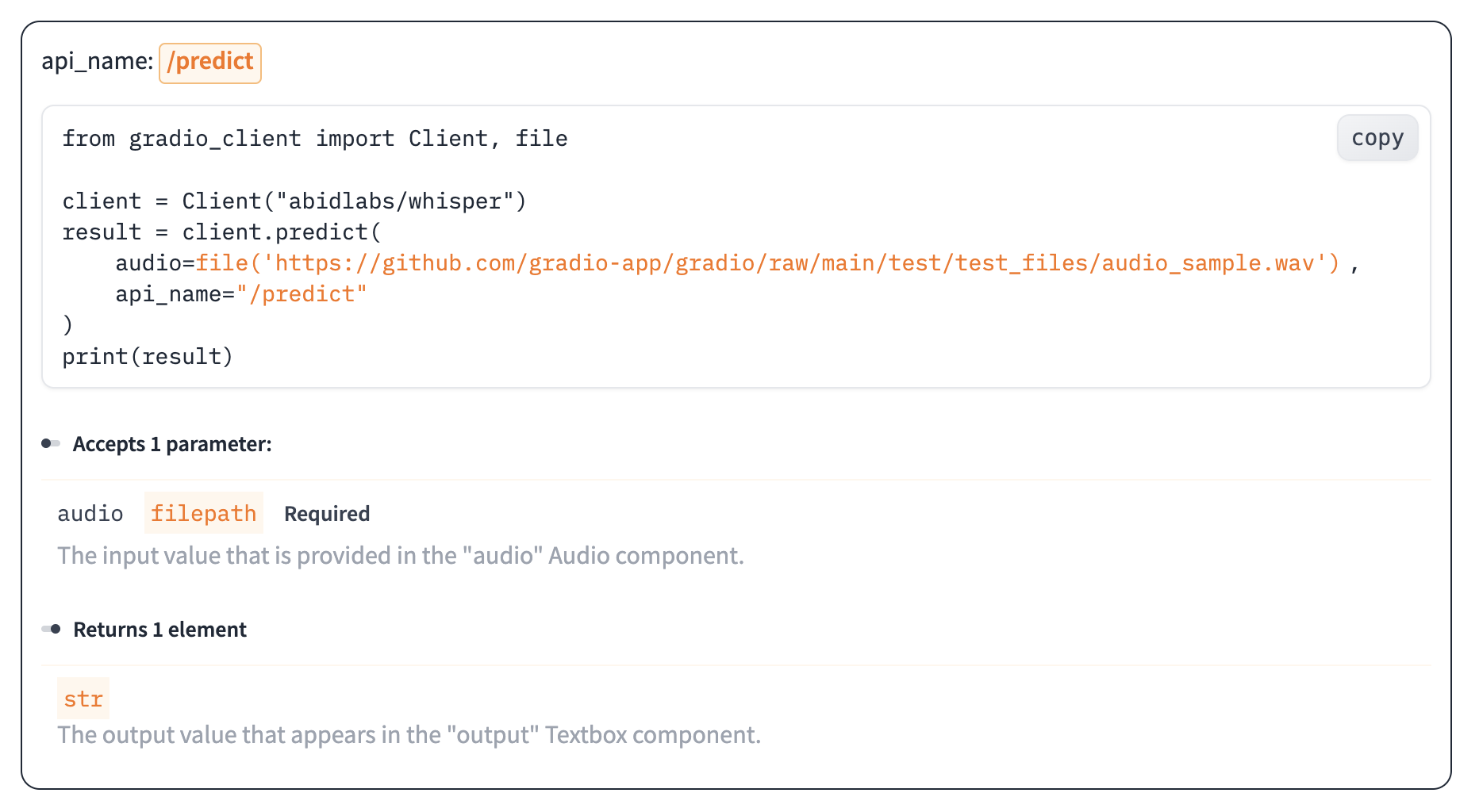
Every Gradio app automatically exposes an API. Users can click "Use via API" in the app footer to see:
* Available endpoints
* Parameter types
* Example code for Python and JavaScript clients
* Interactive API recorder
Learn more in the [Python client](/clients/python-client) and [JavaScript client](/clients/javascript-client) guides.
## Rate limiting
Protect your public API from abuse:
```python theme={null}
import gradio as gr
from collections import defaultdict
import time
rate_limit = defaultdict(lambda: {"count": 0, "timestamp": time.time()})
def check_rate_limit(request: gr.Request):
ip = request.client.host
current_time = time.time()
# Reset count if 1 minute has passed
if current_time - rate_limit[ip]["timestamp"] > 60:
rate_limit[ip] = {"count": 0, "timestamp": current_time}
# Check limit (10 requests per minute)
if rate_limit[ip]["count"] >= 10:
raise gr.Error("Rate limit exceeded. Try again later.")
rate_limit[ip]["count"] += 1
def process(text, request: gr.Request):
check_rate_limit(request)
return f"Processed: {text}"
demo = gr.Interface(
fn=process,
inputs="text",
outputs="text"
)
demo.launch()
```
For OAuth users, rate limit by username instead of IP:
```python theme={null}
def check_rate_limit(request: gr.Request):
identifier = request.username or request.client.host
# Rate limiting logic...
```
## Analytics
By default, Gradio collects basic analytics to improve the library:
* Environment (Colab, Spaces, etc.)
* Components used
* Advanced features enabled
* Unique developer count (via IP)
* Gradio version
**No user data** from your app is collected.
### Disable analytics
```python theme={null}
import gradio as gr
demo = gr.Interface(
fn=lambda x: x,
inputs="text",
outputs="text",
analytics_enabled=False
)
demo.launch()
```
Or set globally:
```bash theme={null}
export GRADIO_ANALYTICS_ENABLED=False
```
## Progressive Web Apps (PWA)
Make your Gradio app installable as a PWA:
```python theme={null}
import gradio as gr
def greet(name):
return f"Hello {name}!"
demo = gr.Interface(
fn=greet,
inputs="textbox",
outputs="textbox"
)
demo.launch(
pwa=True,
favicon_path="./icon.svg" # Optional custom icon
)
```
Users can install your app on their device:

## Next steps
Deploy to Hugging Face Spaces for permanent hosting
Deploy Gradio apps with Docker
This documentation is built and hosted on [Mintlify](https://mintlify.com), a developer documentation platform.