> ## Documentation Index
> Fetch the complete documentation index at: https://mintlify.com/gradio-app/gradio/llms.txt
> Use this file to discover all available pages before exploring further.
# The 4 kinds of Gradio interfaces
> Learn about the different types of interfaces you can build with Gradio's Interface class
The `gr.Interface` class can handle four different kinds of demos, depending on whether you need inputs, outputs, or both.
## Interface types overview
Gradio supports:
1. **Standard demos** - separate inputs and outputs (e.g., image classifier, speech-to-text)
2. **Output-only demos** - no input, only output (e.g., unconditional image generation)
3. **Input-only demos** - no output, only input (e.g., save uploads to database)
4. **Unified demos** - same components for input and output (e.g., text autocomplete)
Depending on the type, the user interface looks different:
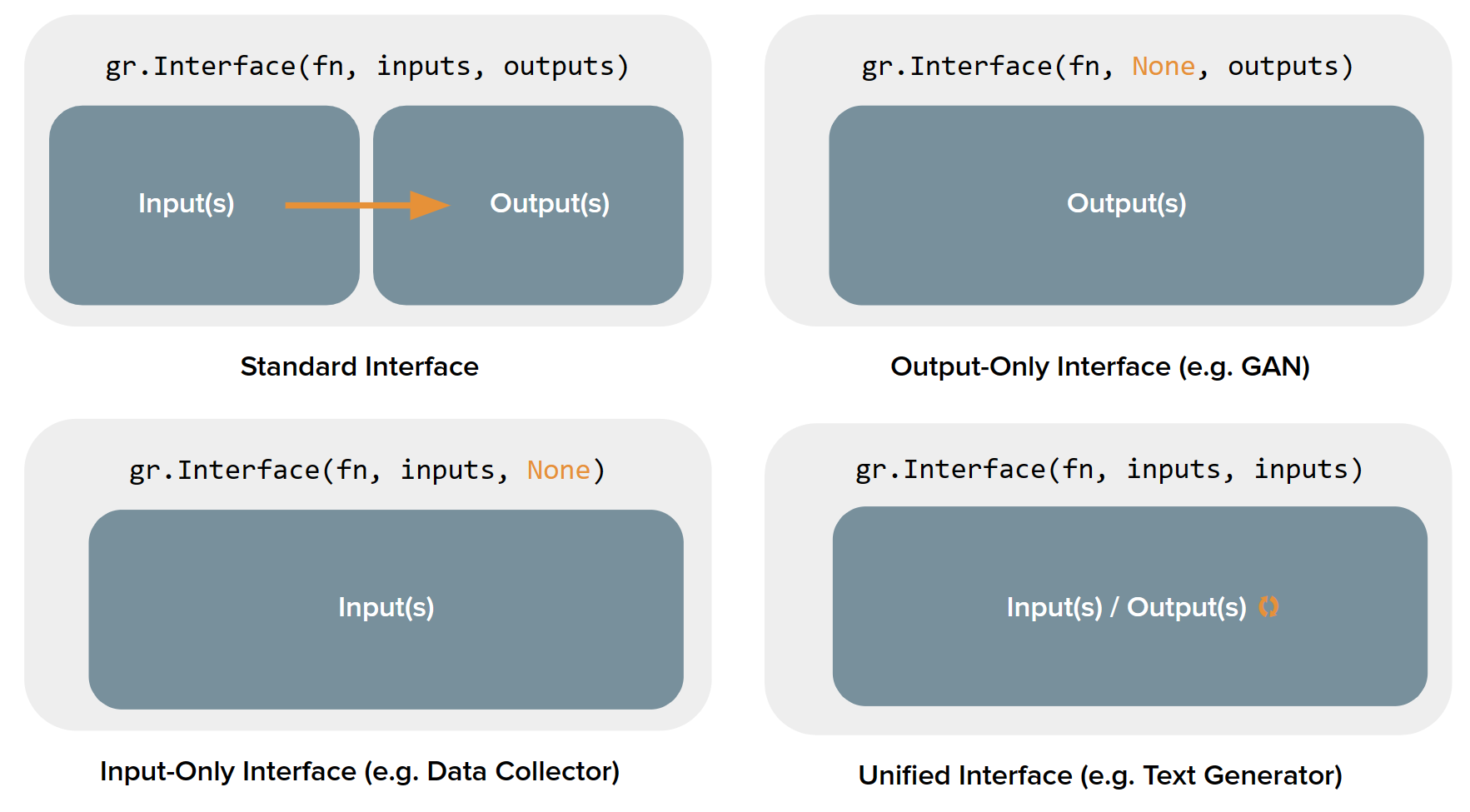
## Standard demos
Standard demos have both input and output components. Set both the `inputs` and `outputs` parameters:
```python theme={null}
import numpy as np
import gradio as gr
def sepia(input_img):
sepia_filter = np.array([
[0.393, 0.769, 0.189],
[0.349, 0.686, 0.168],
[0.272, 0.534, 0.131]
])
sepia_img = input_img.dot(sepia_filter.T)
sepia_img /= sepia_img.max()
return sepia_img
demo = gr.Interface(
sepia,
inputs=gr.Image(),
outputs="image"
)
demo.launch()
```
This creates a standard interface with:
* Input component on the left
* Submit button
* Output component on the right
### Common use cases
* Image classification
* Text translation
* Speech-to-text transcription
* Question answering
* Image-to-image transformations
## Output-only demos
Output-only demos don't take any input but produce output. Set `inputs=None`:
```python theme={null}
import time
import gradio as gr
def fake_gan():
time.sleep(1)
images = [
"https://images.unsplash.com/photo-1507003211169-0a1dd7228f2d",
"https://images.unsplash.com/photo-1554151228-14d9def656e4",
"https://images.unsplash.com/photo-1542909168-82c3e7fdca5c",
]
return images
demo = gr.Interface(
fn=fake_gan,
inputs=None,
outputs=gr.Gallery(label="Generated Images", columns=2),
title="FD-GAN",
description="This is a demo of image generation."
)
demo.launch()
```
The interface shows:
* A "Generate" button (instead of "Submit")
* Only the output component
* No input components
### Common use cases
* Unconditional image generation (GANs)
* Random quote generators
* Daily predictions
* Noise generation
* Any function that requires no user input
## Input-only demos
Input-only demos take input but produce no visible output. Set `outputs=None`:
```python theme={null}
import random
import string
import gradio as gr
def save_image_random_name(image):
random_string = ''.join(random.choices(string.ascii_letters, k=20)) + '.png'
image.save(random_string)
print(f"Saved image to {random_string}!")
demo = gr.Interface(
fn=save_image_random_name,
inputs=gr.Image(type="pil"),
outputs=None,
)
demo.launch()
```
The interface shows:
* Only input components
* A submit button
* No output components
### Common use cases
* Save uploads to a database
* Submit feedback forms
* Log data for analytics
* Trigger external processes
* Any function where the output isn't meant for display
## Unified demos
Unified demos use the same component for both input and output. The output overwrites the input:
```python theme={null}
import gradio as gr
def generate_text(prompt):
# Simulate text generation by adding to the prompt
return prompt + " (generated continuation...)"
demo = gr.Interface(
generate_text,
inputs=gr.Textbox(lines=5, label="Input Text"),
outputs=gr.Textbox(lines=5, label="Input Text"),
)
demo.launch()
```
To create a unified interface, set `inputs` and `outputs` to the **same component instance**.
Here's the correct way:
```python theme={null}
import gradio as gr
textbox = gr.Textbox(lines=5)
def text_generation(text):
return text + " [AI generated continuation]"
demo = gr.Interface(
text_generation,
inputs=textbox,
outputs=textbox, # Same instance
)
demo.launch()
```
The interface shows:
* A single component that serves as both input and output
* Output replaces the input when function completes
* Useful for iterative transformations
### Common use cases
* Text autocomplete/generation
* Image enhancement (input image → enhanced image)
* Code formatting/refactoring
* Translation with same text box
* Any iterative refinement task
## Detecting interface type
Gradio automatically detects the interface type based on your configuration:
```python theme={null}
from gradio.data_classes import InterfaceTypes
# Standard: different inputs and outputs
if inputs and outputs and inputs != outputs:
interface_type = InterfaceTypes.STANDARD
# Output-only: no inputs
if not inputs and outputs:
interface_type = InterfaceTypes.OUTPUT_ONLY
# Input-only: no outputs
if inputs and not outputs:
interface_type = InterfaceTypes.INPUT_ONLY
# Unified: same components for input and output
if inputs == outputs:
interface_type = InterfaceTypes.UNIFIED
```
## When to use each type
Use when you have a clear transformation: input → processing → output
Most common type for machine learning models.
Use when your function generates content without user input
Perfect for generative models that don't need conditioning.
Use when you need to collect data without showing results
Great for data collection, logging, or backend operations.
Use when input and output are the same type and output should replace input
Best for iterative refinement or enhancement tasks.
## Beyond the four types
If none of these types fit your needs, you'll want to use `gr.Blocks()` instead, which provides:
* Multiple functions with different input/output combinations
* Custom layouts and arrangements
* More complex interactivity
* Conditional visibility
* State management across multiple components
See the [Blocks documentation](/guides/blocks) for more advanced use cases.
## Complete examples
```python theme={null}
import gradio as gr
def classify_image(img):
return {"cat": 0.7, "dog": 0.2, "bird": 0.1}
demo = gr.Interface(
classify_image,
inputs=gr.Image(),
outputs=gr.Label(num_top_classes=3),
title="Image Classifier",
description="Upload an image to classify it"
)
demo.launch()
```
```python theme={null}
import gradio as gr
import numpy as np
def generate_random_image():
return np.random.randint(0, 255, (100, 100, 3), dtype=np.uint8)
demo = gr.Interface(
generate_random_image,
inputs=None,
outputs=gr.Image(),
title="Random Art Generator"
)
demo.launch()
```
```python theme={null}
import gradio as gr
def save_feedback(name, rating, comments):
with open("feedback.txt", "a") as f:
f.write(f"{name}: {rating}/5 - {comments}\n")
print(f"Saved feedback from {name}")
demo = gr.Interface(
save_feedback,
inputs=[
gr.Textbox(label="Name"),
gr.Slider(1, 5, label="Rating"),
gr.Textbox(label="Comments", lines=3)
],
outputs=None,
title="Feedback Form"
)
demo.launch()
```
```python theme={null}
import gradio as gr
textbox = gr.Textbox(lines=10, label="Text Editor")
def format_text(text):
# Simple formatting: uppercase first letter of sentences
return ". ".join([s.strip().capitalize() for s in text.split(".")])
demo = gr.Interface(
format_text,
inputs=textbox,
outputs=textbox,
title="Text Formatter"
)
demo.launch()
```
## Next steps
Learn more about the Interface class
Build more complex interfaces with Blocks
Working with examples in interfaces
Create live and streaming interfaces
This documentation is built and hosted on [Mintlify](https://mintlify.com), a developer documentation platform.